- What is image EXIF data?
- Why EXIF matters for local search
- Two files, same photo, different EXIF data
- How much does image EXIF data affect local SEO?
- Workflows that keep EXIF without adding risk
- Google Business Profile photos: what actually helps
- EXIF geotagging: do’s and don’ts
- Myths worth clearing up
- On-page image practices that move the needle far more than EXIF
- Simple checks before you hit upload
- FAQ: image EXIF data and local SEO
Notes
Does image EXIF data improve local SEO?
Article — Image EXIF data can play a small but real part in local SEO results. On its own, EXIF won’t put your café straight into the local map 3 pack. Yet authentic, well-named photos with clean EXIF can add trust and context. Audit your image EXIF data before uploading to your Google Business Profile or website.
Posted by Jase Porter
10.09.2025


What's in the article:
What is image EXIF data?
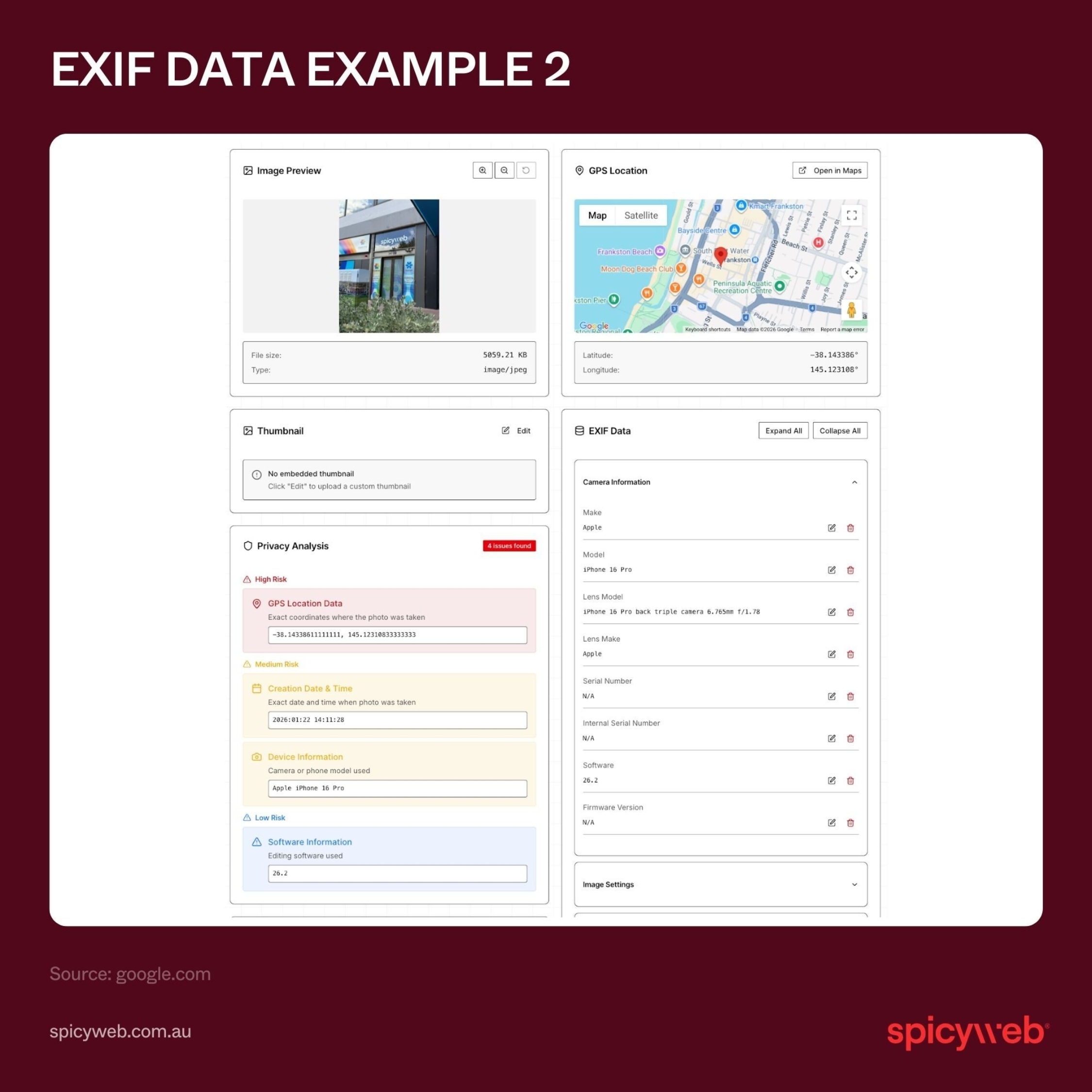
EXIF (Exchangeable Image File) data is the technical record inside an image file. Common fields include date and time (to the second), camera model and lens, software used to edit the image, and—crucially for local—GPS latitude, longitude, altitude, and even the direction the camera faced. Think of EXIF as a digital fingerprint that helps systems understand whether a photo is original and where it was taken.
Why EXIF matters for local search
Search engines and mapping systems cross-check many signals to judge a business: distance, relevance, prominence, and user activity. EXIF sits in the “do the 1%ers” of extra SEO optimisation that can help you outrank a rival when the basics are already strong. Photos with natural timestamps and GPS can reinforce that your images—and by extension, your venue—are real and current. That can support confidence in your Google Business Profile and your website gallery.
Two files, same photo, different EXIF data
Exported graphics from tools like Canva often strip EXIF. You can end up with a sharp, on-brand image that carries almost no machine-readable context beyond the file name and any fields the tool adds (for example, software name and an author tag). The original phone photo, by contrast, usually keeps full EXIF, including GPS and device details. If both versions look the same, the version with intact EXIF offers extra evidence that the image is genuine.


EXIF Fields that matter most
If you choose to keep or add EXIF, focus on:
- GPS latitude and longitude
- GPS altitude (commonly skipped but easy to keep from the original)
- Image direction (bearing) - DateTimeOriginal (the moment the photo was taken)
- Camera and lens details - Software tag (shows what edited or exported the file)
- Artist/Creator and Copyright (you can set these to your business name)
These fields don’t replace on-page context, but they can back it up.
How much does image EXIF data affect local SEO?
Short answer: A small amount.
Treat EXIF as a minor trust signal that supports the story your content already tells. If you have strong pages, consistent business details, frequent Google Business Profile uploads, and real customer photos, EXIF can add polish. If those foundations are weak, EXIF won’t save the day.
Workflows that keep EXIF without adding risk
Shoot on site, keep it natural, use a smartphone
Use your phone at the venue: shopfront, interior, menu items, staff in service, nearby landmarks and tram stops. Keep DateTimeOriginal and GPS if you’re comfortable sharing location data. If privacy is a concern, remove GPS but keep timestamps.
Edit without nuking metadata
Some editing tools strip EXIF on export. If you need to blur brands or tweak exposure, use export settings that preserve metadata. If the tool wipes everything, re-save a copy from a tool that lets you retain or restore key fields. Keep it honest: don’t write coordinates that don’t match reality.
File names, titles, and alt text
- File name: Use clear words that match the image. Example: melbourne-cbd-cafe-shopfront.jpg or st-kilda-latte-art.jpg.
- Image title: Many CMSs copy the file name into the image title (dashes and all). After upload, rewrite the title as normal words: “Melbourne CBD café shopfront”.
- Alt text: Keep it short and factual: “Barista pouring latte art at our St Kilda café.” If your file name already nails it, you can base alt text on that—just remove hyphens and keep it readable.
Google Business Profile photos: what actually helps
Quality, variety, recency
Post clear, bright photos of what people care about: brunch plates, coffee, outdoor seating, accessibility, pram space, queue at peak times, and a clean shot of the shopfront. Aim for steady uploads each week or fortnight to show real activity.
Keep EXIF if you can
If your photos carry GPS and timestamps from the device, great. If not, don’t stress—quality and recency beat hand-edited metadata.
Customer photos and reviews
Encourage customers to add photos in their reviews. User shots are strong social proof and help your listing look alive.
EXIF geotagging: do’s and don’ts
Do
- Keep natural DateTimeOriginal and GPS from on-site photos.
- Include altitude and image direction where available.
- Set Artist/Creator and Copyright to your business.
- Use standard EXIF fields—no odd custom tags.
- Pair every image with clear on-page text that names the suburb and the item shown.
Don’t
- Don’t bulk-stamp hundreds of images with the same coordinates.
- Don’t fake GPS on stock photos or AI art.
- Don’t rely on EXIF to fix thin pages or a neglected profile.
- Don’t leave titles full of dashes after upload.
- Don’t stuff brand names or suburbs into every field.
Myths worth clearing up
“Geotag every image and you’ll jump into the map pack.”
Map pack visibility depends mainly on distance to the searcher, relevance of your category/content, and real-world prominence. EXIF can help confirm authenticity, but it won’t beat weak content or a poor reputation.
“If an image has no EXIF, it’s useless for local.”
Plenty of high-ranking pages and strong profiles rely on great visuals and strong copy without EXIF. EXIF is nice to have, not a must.
“Re-saving old files with GPS makes them fresh.”
Freshness comes from new photos, new reviews, seasonal menus, and steady activity—not just metadata edits.
On-page image practices that move the needle far more than EXIF
Put images near the most relevant copy
If the section is about “best brunch in Fitzroy”, place your Fitzroy shopfront or a hero brunch plate right there, with the suburb in the paragraph.
Use headings that match search intent
Add plain headings that line up with what people type: “Gluten-free brunch in Richmond”, “Outdoor seating in Carlton”, “Kid-friendly café in Elsternwick”.
Speed and format
Export WebP or well-compressed JPGs to keep pages fast. A quick page helps users choose you on mobile.
Simple checks before you hit upload
EXIF checks
- DateTimeOriginal looks right.
- GPS fields (lat/long/altitude) match the venue.
- Image direction present when available.
- Artist/Creator and Copyright set to your business.
Content checks
- File name says what the image shows.
- Title rewritten as clean words in the CMS.
- Alt text short, accurate, and human.
- Nearby copy names the suburb, product, and any standout detail.
FAQ: image EXIF data and local SEO
Does EXIF help rankings?
Slightly. Treat it as a helper signal, not a core driver.
Should I add GPS to every image?
No. Keep it natural. On-site photos with real EXIF are fine. Focus most effort on quality, speed, and useful copy.
Is altitude worth keeping?
Yes. It’s part of a truthful device record and is often left out when people try to fake EXIF.
What about images exported from Canva?
They may lose EXIF. That’s okay if the photo quality and on-page context are strong. If EXIF matters for a given shot, export in a way that preserves it or upload the original.
Do dashes in file names matter?
Search systems handle hyphens well. If your CMS converts the file name into a title full of dashes, rewrite the title on upload. Keep file names descriptive; keep titles human. Add descriptive “alt” text that describes the image.